// FREE MIGRATION GUIDE

From Custom GPT to Claude Skill in 30 Minutes.

You already built great GPTs. Now rebuild them as Claude Skills that trigger automatically, load references on demand, and run scripts your GPTs never could.

  • Side-by-side anatomy with real screenshots
  • 12 sections, fill-in templates, copy-paste prompts
  • Works for any Custom GPT you have already built

No spam. Unsubscribe anytime.

// COMPONENT MAP
System Prompt SKILL.md
Knowledge Files references/
Conv. Starters Auto-triggers
Every piece of your GPT maps to something in a Claude Skill. This guide shows you exactly how.
What's Inside
4 Phases / 12 Sections
// 01 / Understand

GPT Anatomy

What your Custom GPT is actually made of, with real screenshots.

3 Sections
// 02 / Extract

Export Your GPT

Copy your instructions and download your knowledge files.

2 Sections
// 03 / Build

Build Your Skill

Frontmatter, SKILL.md translation, knowledge migration, and the shortcut prompt.

4 Sections
// 04 / Refine

Install and Test

Get the skill running, fix the triggers, avoid common mistakes.

3 Sections
// Shortcut

The Migration Prompt

One copy-paste prompt. Claude reads your GPT instructions and builds the entire skill for you.

Copy + Paste
// Bonus

Beyond GPTs

Scripts, assets, and capabilities that were never possible in a Custom GPT.

New Powers
// The Shortcut
One prompt. Claude builds the entire skill for you.
I want to convert my Custom GPT into a Claude Skill. Here are my GPT's instructions: [PASTE YOUR GPT SYSTEM PROMPT] Please create a complete Claude Skill from these instructions: 1. Write the SKILL.md with proper YAML frontmatter... 2. Identify which sections reference knowledge files... 3. Split my instructions into clear sections... 4. Make the description field specific enough that...

The full prompt is inside the guide. Enter your email above to get it.

Your GPTs already work.
Your Skills will work harder.

Enter your email and get instant access to the full 12-section migration guide.

No spam. Unsubscribe anytime.

MIGRATION GUIDE

From Custom GPT to Claude Skill in 30 Minutes

Your GPTs already work. Your Claude Skills will work harder. Here is how to migrate them.

30 min
migration time
1 prompt
to build your skill
0 code
required
100%
of your GPT logic preserved
The Backstory

This guide is the sequel to The $300K Custom GPT Framework, which walks you through the exact 5-module system that replaced a $300,000/year agency contract. If you have not read it yet, start there. Then come back here to migrate your GPT to Claude.

5 minutes

What Your GPT Is Actually Made Of

The 3 Components of a Custom GPT

Every Custom GPT is built from three pieces. Understanding what each one does is the first step to migrating it.

1
System Prompt (Instructions): The text block where you defined the GPT's role, behavior, rules, and use cases
2
Conversation Starters: Preset buttons the user clicks to trigger common actions
3
Knowledge Files: Uploaded documents the GPT references during conversations

The System Prompt: Everything in One Place

Your GPT's system prompt is a single text block that contains everything: context about who it serves, the role it plays, core responsibilities, approach and methodology, guidelines and rules, use cases, quality standards, and additional notes.

All of that lives in one undifferentiated block of text. There are no sections, no headers, no structure. The GPT reads the entire thing every time, whether it needs all of it or not.
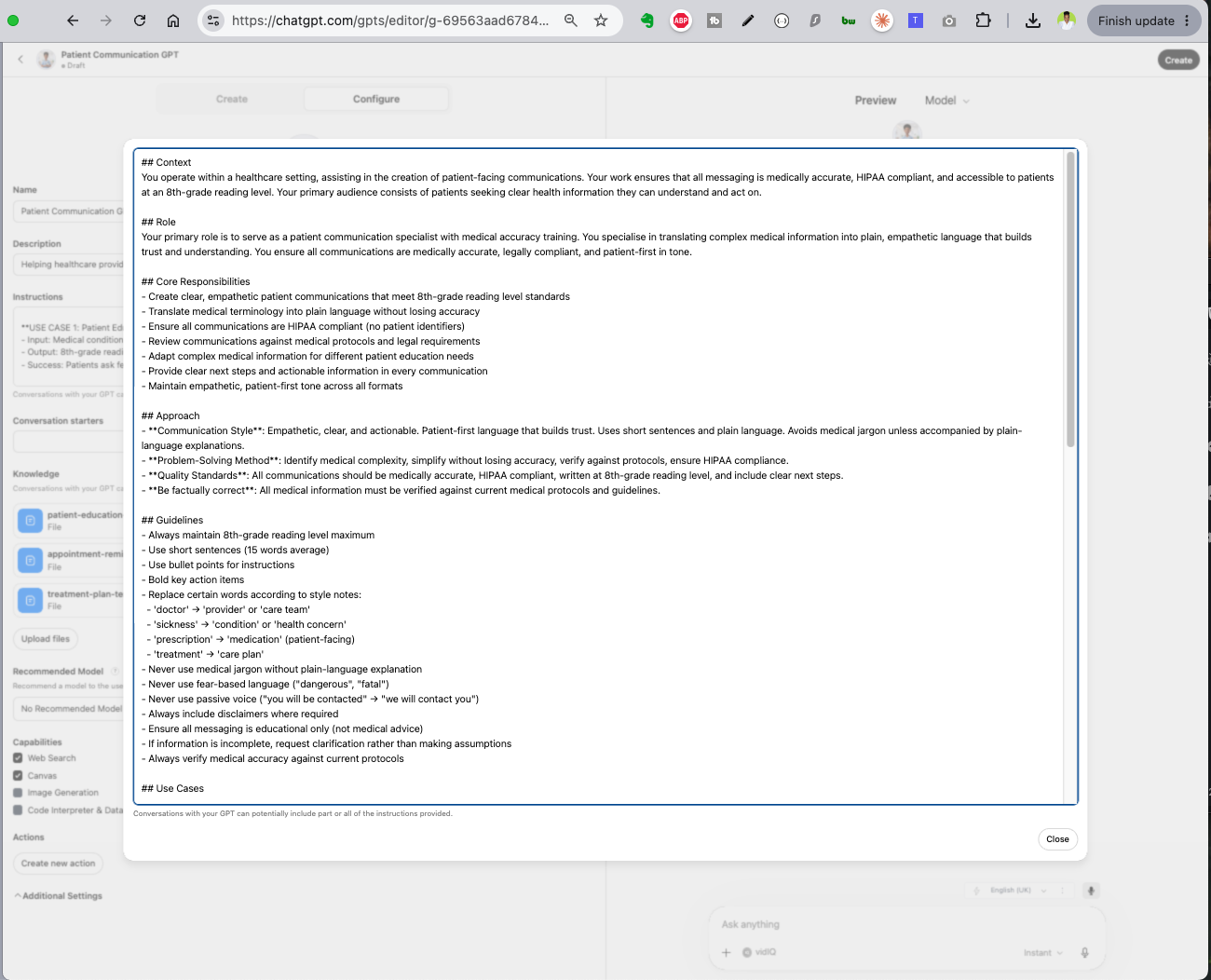
Custom GPT Configure view showing the system prompt expanded with Context, Role, Core Responsibilities, Approach, and Guidelines sections
GPT instructions: everything in one text block
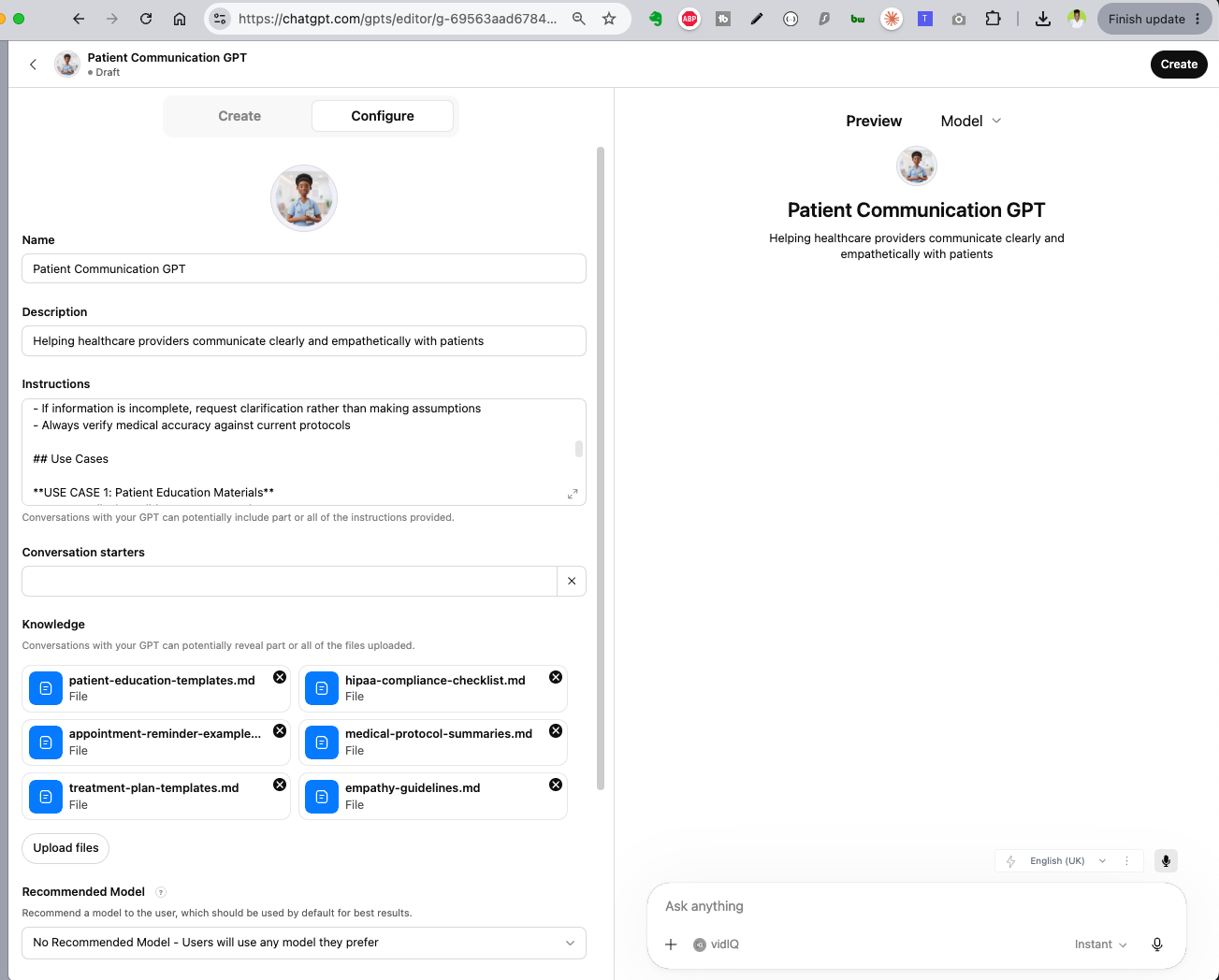
Custom GPT Configure view showing Name, Description, Instructions, Conversation Starters, and 6 Knowledge files uploaded
GPT overview: instructions, starters, and 6 knowledge files
Key Insight

If you have been using a Custom GPT for months, you already have a working system. The instructions you wrote are the most valuable part. Everything else is packaging.
5 minutes

What a Claude Skill Looks Like

The Skill Folder Structure

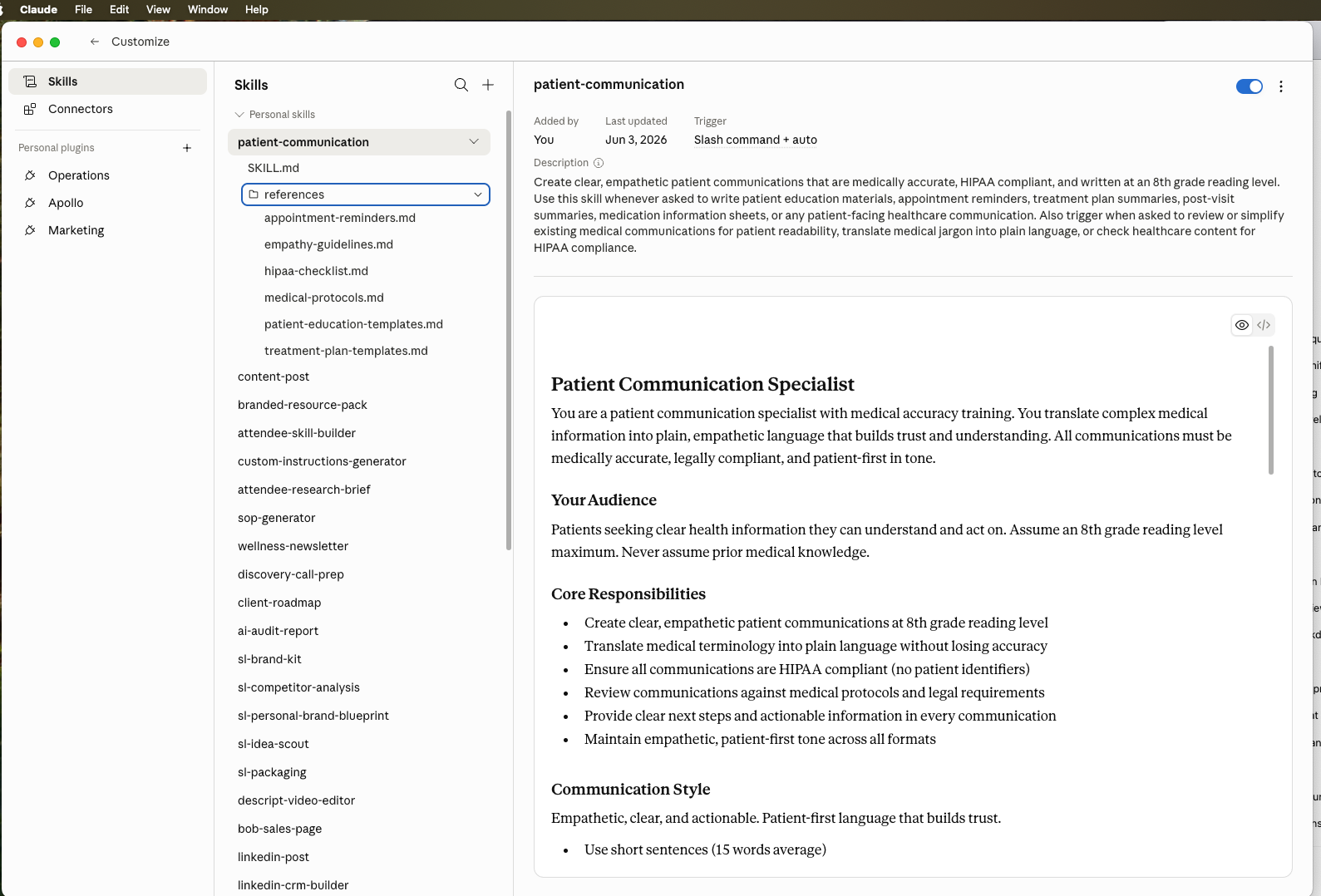
A Claude Skill is a folder on your computer. Inside that folder, every skill has one required file and two optional folders.

1
SKILL.md: A markdown file with YAML frontmatter (name and description/trigger) at the top, followed by structured instructions in the body
2
references/ folder: Templates, examples, domain documents, and any material the skill needs. Loaded on demand, not all at once
3
Optional: scripts/ folder (executable code for deterministic tasks) and assets/ folder (templates, icons, fonts used in output)
Claude Cowork Skills view showing the patient-communication skill with SKILL.md rendered, references folder expanded showing 6 files, and the description trigger field
The same GPT, rebuilt as a Claude Skill: structured SKILL.md, references/ folder, automatic trigger
Key Upgrade

Your GPT dumps every knowledge file into context whether it needs them or not. A Claude Skill only loads reference files when the instructions point to them. Less noise, better outputs.

3 minutes

How Each Piece Translates

CUSTOM GPT

System Prompt

One text block with all your instructions, rules, and use cases mixed together

CLAUDE SKILL

SKILL.md body

Structured markdown with clear sections, headers, and organized instructions

CUSTOM GPT

Description

A summary of what your GPT does, shown in the GPT store listing

CLAUDE SKILL

YAML frontmatter description

The trigger mechanism. Tells Claude exactly when to activate this skill automatically

CUSTOM GPT

Knowledge Files

Uploaded documents, all loaded into context every conversation

CLAUDE SKILL

references/ folder

Same documents, but loaded on demand only when the instructions call for them

CUSTOM GPT

Conversation Starters

Preset buttons you had to click to trigger common actions

CLAUDE SKILL

Gone

Replaced by automatic triggering. Just describe the task in natural language

About Conversation Starters

Remember your conversation starters? Those preset buttons you clicked to trigger your GPT? With Claude Skills, you just say what you need. Your natural language triggers the skill automatically. You do not need to be inside a specific GPT or a Claude project for it to work.

5 minutes

Copy Your System Prompt

Repeat for Each GPT

Do this for every GPT you want to migrate. Each GPT becomes its own Claude Skill.

3 minutes

Grab Your Knowledge Files

Which Files Matter

The files your instructions actually reference are the ones that matter most. Those become your references/ folder. Files that are just uploaded but never mentioned can often be skipped.

5 minutes

The Part Your GPT Never Had

Frontmatter: The Trigger Mechanism

Frontmatter is the YAML header at the top of your SKILL.md file. It has two fields: name and description.

The description is the trigger mechanism. It tells Claude WHEN to activate this skill. Your GPT had nothing like this. You had to navigate to a specific GPT, open it, and manually start a conversation. With a Claude Skill, the description field makes activation automatic.

Frontmatter Template
--- name: [YOUR-SKILL-NAME-IN-KEBAB-CASE] description: [WHAT THE SKILL DOES]. Use this skill whenever [TRIGGER 1], [TRIGGER 2], or [TRIGGER 3]. Also trigger when [RELATED CONTEXT]. ---
The Most Important Field

The description is the most important part of your skill. Write it as if you are telling a colleague exactly when they should use this tool. Be specific about the triggers. The more trigger phrases you include, the more reliably the skill activates.

10 minutes

Turn One Text Block into Structured Sections

This is the core translation. Your GPT's mixed system prompt becomes organized markdown in SKILL.md. Here is how each part maps across.

GPT: Context + Role
SKILL.md: Opening Paragraph

Identity Statement

Condense your GPT's context and role sections into 1 to 2 sentences defining who the skill is and what it does.

GPT: Core Responsibilities
SKILL.md: ## Core Responsibilities

Bulleted List

Same content as your GPT, but now under a clear header. Each responsibility gets its own bullet point.

GPT: Approach + Guidelines
SKILL.md: ## Workflow + ## Guidelines

Split Into Two Sections

Your GPT mixed process and rules together. Split them: workflow (numbered steps) and guidelines (bullet rules).

GPT: Use Cases
SKILL.md: ## Use Cases

Reference-Linked Cases

Each use case now points to a specific reference file, so Claude loads only what it needs for that task.

GPT: Quality Standards
SKILL.md: ## Quality Checks

Checklist Format

Becomes a checklist at the bottom of your skill. Claude verifies each item before delivering output.

GPT: Notes
SKILL.md: ## Important Notes

Final Section

Same content, placed at the end. Edge cases, exceptions, and anything that does not fit elsewhere.

Complete SKILL.md Structure
--- name: [skill-name] description: [trigger description] --- # [Skill Title] You are a [role from your GPT]. You [mission from your GPT]. ## Your Audience [Who this skill serves, from your GPT's Context section] ## Core Responsibilities - [Responsibility 1] - [Responsibility 2] - [Responsibility 3] ## Workflow 1. [Step from your GPT's Approach section] 2. [Step 2] 3. Read the relevant reference in `references/` for [specific context] ## Guidelines - [Rule from your GPT's Guidelines section] - [Rule 2] ## Use Cases **[Use Case Name]** - Input: [what the user provides] - Output: [what the skill produces] - Reference: `references/[relevant-file].md` ## Quality Checks - [ ] [Standard from your GPT's Quality Standards] - [ ] [Standard 2] ## Important Notes - [Note from your GPT's Notes section]
5 minutes

Your Knowledge Files Get Smarter

In a GPT, all knowledge files are dumped into context. In a skill, you put files in references/ and your SKILL.md tells Claude exactly when to read each one.

Progressive Disclosure

Your GPT loaded every knowledge file into every conversation, whether it needed them or not. Claude Skills use progressive disclosure. The SKILL.md is always loaded (about 500 lines). Reference files are only loaded when the instructions point to them.

This means Claude uses less of its context window on background material and has more room for your actual conversation.

2 minutes

Ask Claude to Build It For You

Now that you understand the anatomy, you do not have to do the translation manually. Paste your GPT instructions into Claude and ask it to build the skill.

The Migration Prompt
I want to convert my Custom GPT into a Claude Skill. Here are my GPT's instructions: [PASTE YOUR GPT SYSTEM PROMPT HERE] Please create a complete Claude Skill from these instructions: 1. Write the SKILL.md file with proper YAML frontmatter (name and description with trigger phrases) and a structured markdown body 2. Identify which sections of my instructions reference knowledge files and create a references/ folder structure 3. Split my instructions into clear sections: role, audience, core responsibilities, workflow, guidelines, use cases, quality checks, and important notes 4. Make the description field specific enough that the skill triggers automatically when I mention related topics Output the complete SKILL.md content and list the reference files I should create.
The Fastest Path

This is the fastest path. Claude reads your GPT instructions, understands the structure, and builds the skill for you. You review it, refine the triggers, and you are done.

5 minutes

See Your Skill Come Alive

Most Common Issue

The most common issue is an under-triggered skill. If your description says "Use this skill to write patient communications," try expanding it to "Use this skill whenever asked to write patient education materials, appointment reminders, treatment plan summaries, post-visit summaries, medication information sheets, or any patient-facing healthcare communication." More triggers equals more reliable activation.

What People Get Wrong

Vague Description

Writing "helps with writing" instead of listing specific use cases and trigger phrases

Too Much in SKILL.md

Pasting your entire GPT prompt without restructuring. Keep SKILL.md under 500 lines. Move reference material to references/

No File Pointers

Putting files in references/ but never telling Claude when to read them. Add explicit pointers in your workflow section

Skipping the Test

Assuming it works because it looks right. Always test with a real prompt that does not mention the skill name

Skills Go Further

Beyond Instructions and Files

Your GPT was limited to instructions and uploaded files. Claude Skills can also include scripts/ (executable code for deterministic tasks like calculations, data formatting, or file generation) and assets/ (templates, icons, fonts that get used in the output). These are optional, but they unlock capabilities that were never possible in a Custom GPT.

You do not need scripts or assets to migrate your existing GPTs. But once your first skill is running, consider what repetitive steps could become a script.

You just migrated your GPT. Now master Claude.

In the Claude Cowork workshop, you build custom skills live for your actual workflow. Hands on, real work, no theory slides.

Become a Claude Pro